Open-source Sonic kart racing
That One Thing
It is Sonic Robo Blast 2's netcode wearing a kart — Race, Battle, items, and +connect over PlayBound Connect.
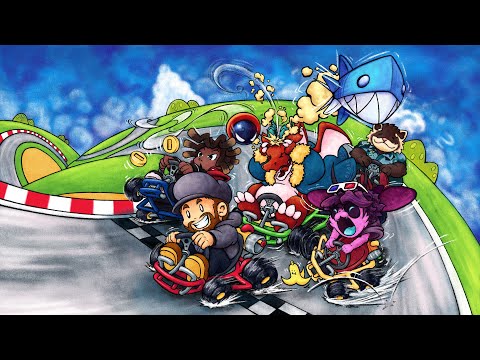
SRB2Kart is the free open-source kart racer spun out of Sonic Robo Blast 2. Drift, boost, and lob items across community and stock tracks; Race and Battle modes cover the Mario Kart formula without a Nintendo tax. Local splitscreen works; online multiplayer uses the same Doom-engine networking as SRB2 on UDP port 5029.
PlayBound installs the official v1.6 Windows installer from the Kart-Public GitHub release (macOS gets the dmg). Join Game passes `+connect host:port` the same way SRB2 does, so private parties ride PlayBound Connect's virtual LAN without manual IP pasting when the launcher can inject args.
The roster and tracks are Sonic-flavored fan work, not Sega licensed products — the same honest freeware stance as SRB2 itself. Mod support and the Message Board scene keep the game alive years after 1.6.
We carry it because free online kart racing with real netcode still clears the bar next to SuperTuxKart, and because the install path is a single official GitHub asset.
We picked SRB2Kart because it is a finished free kart racer with genuine online multiplayer, splitscreen, and a one-click official installer — the same Connect path as SRB2 without inventing a new transport.
Great if you want
Look elsewhere if
Checking…
Minimum
1.0 GHz CPU · 1 GB RAM · OpenGL 1.4 GPU · 300 MB storage
Recommended
Dual-Core 2.0 GHz CPU · 2 GB RAM · Dedicated OpenGL GPU · 500 MB storage · gamepad
Yes. It is free and open-source under GPL-2.0. The official builds are on GitHub (STJr/Kart-Public).
Same family as SRB2: host a network game on UDP 5029. PlayBound Connect puts the party on one virtual LAN and Join Game can pass +connect host:port.
Yes. v1.6 uses the SDL Game Controller API for a wide range of pads. PlayBound does not rewrite a config file.
No. It is a free fan game from the Sonic Team Junior / Kart community, like SRB2.
Yes. SRB2Kart supports up to 16 players. You can join a public community server from the PlayBound server browser and host a game on your own PC. PlayBound Connect handles the setup: start a party with your friends, pick how you want to play, and everyone launches into the same game from the PlayBound launcher. There is no subscription and no paid multiplayer tier.
Yes. Sonic Robo Blast 2 Kart supports up to 16 players. You can have PlayBound start a dedicated server for your group. PlayBound Connect handles the setup: start a party with your friends, pick how you want to play, and everyone launches into the same game from the PlayBound launcher, with the dedicated server started for you if you choose one. It also supports LAN play. There is no subscription and no paid multiplayer tier.
Community
Official Discord
No verified official Discord has been submitted.
Developers can contact PlayBound to verify an official community link.
PlayBound Discord
Chat with PlayBound players in #sonic-robo-blast-2-kart.
Join #sonic-robo-blast-2-kart ↗
Solved this in Discord? Post the fix here so the next player can find it.
Nothing scheduled yet. Bring your friends together for a game night.
Create eventSign in to publish a community event, or start a party and play now.
Start a party →This game natively supports a controller — no setup needed.
Default bindings for every input method Sonic Robo Blast 2 Kart supports. These are the game's own defaults — anything you have remapped will differ.
Read from the default kartconfig.cfg that SRB2Kart writes on a fresh install. Everything can be rebound under Options > Setup Controls.
Default keyboard and mouse bindings.
Keyboard only; the mouse is off by default.
| Action | Default input |
|---|---|
| Look backward | Left Shift |
| Reset camera | Home |
| Toggle camera | Backspace |
| Look up / down | Page Up / Page Down |
| Center view | End |
| Change viewpoint | F12 |
| Action | Default input |
|---|---|
| Use or throw item | Space |
| Action | Default input |
|---|---|
| Pause | Pause / Break |
| Action | Default input |
|---|---|
| Spectate | ' |
| Chat | T |
| Scores | Tab |
| Action | Default input |
|---|---|
| Steer left / right | Left / Right Arrow |
| Aim item forward / backward | Up / Down Arrow |
| Accelerate | A |
| Brake | D |
| Drift | S |
| Action | Default input |
|---|---|
| Console | ~ |
| Screenshot | F8 |
| Record GIF | F9 |
Verified against the game by PlayBound.
Default gamepad layout, using the standard face-button names.
Standard gamepad through SDL, with the left stick steering and aiming and the triggers on item and drift. Buttons are the game's joystick button numbers; on an Xbox pad button 1 is A, 2 is B, 3 is X and 4 is Y.
| Action | Default input |
|---|---|
| Look backward | X (button 3) |
| Change viewpoint | Y (button 4) |
| Action | Default input |
|---|---|
| Use or throw item | Left Trigger |
| Action | Default input |
|---|---|
| Pause | Joystick button 5 |
| System menu | Joystick button 7 |
| Action | Default input |
|---|---|
| Scores | D-pad up |
| Chat | D-pad down |
| Action | Default input |
|---|---|
| Steer | Left Stick left / right |
| Aim item forward / backward | Left Stick up / down |
| Accelerate | A (button 1) |
| Brake | B (button 2) |
| Drift | Right Trigger |
Verified against the game by PlayBound.
Activity
0
playing now
Updated every 15 minutes